






Reports & Results
Q: What Reports will be available?
A: Provider notes including:
- Inpatient reports including History & Physical, Consultation and Discharge summary
- Ambulatory reports including Clinic Visit Note and Ambulatory History & Physical
- Emergency Room Including Emergency Room Visit Note
- Diagnostic reports including X-rays, MRIs, CTs, Ultrasounds, Mammograms, Nuclear Medicine, Sleep Studies, and Cardiovascular Reports.
Q: How do I access reports?
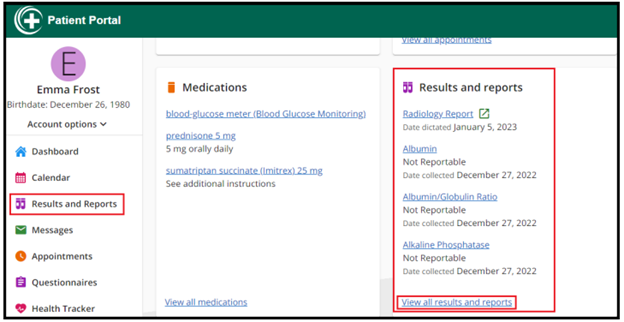
A: Select “Results and Reports”
Q: When will my reports be available?
A: Your medical record reports and your diagnostic reports will be available with 36 hours of authentication by the provider/care team.
Q: What results will be available?
A: All laboratory and microbiology results will be available in the portal. First, Select Results and Reports from the home screen.
Q: What do the H, N, & L under results mean?
A: Key:
- H = High
- L = Low
- N = Normal
- *H = Critical High
- *L = Critical Low
- = Microbiology Abnormal
- # = Significant Change since it was last reported
- A = Abnormal (Test Result)
- *A = Critical Abnormal (Test Result)
Q: How do I print my lab results?
A: All reports launched within the portal will open in a separate browser tab. When the user selects the ‘View Details’ button they will be immediately branched out to a new browser tab where they can review the information in PDF format and print the results.